
User Guide
How to use the DELPHI platform: navigating use-case panels, exporting data, and the line of business and carrier classification systems.
Table of Content
- Platform overview: Your first steps in the platform
- Use-case overview: Navigating use-case panels
- Data exports: Downloading data for further analysis
- Lines of business classification: Understanding our LoB classification system
- Insurance entity classification: Understanding Pythia’s carrier classes
- Forecasting criteria: Exploring our forecasting inputs
Platform overview: Your first steps in the platform
Welcome to Pythia!
Our goal is to make it easy for you to access deep insights with a few clicks.
Our homepage is broken down into a few different sections that reflect different groups of insights. For example, we have a section for ‘Insurance market sizing’ where you can split market premiums a few different ways. We also have a section for ‘Carrier performance benchmarking’, where you can compare between carriers and a ‘Carrier profiles’ section where you can focus on the book and performance of a specific carrier group and its writing carriers.
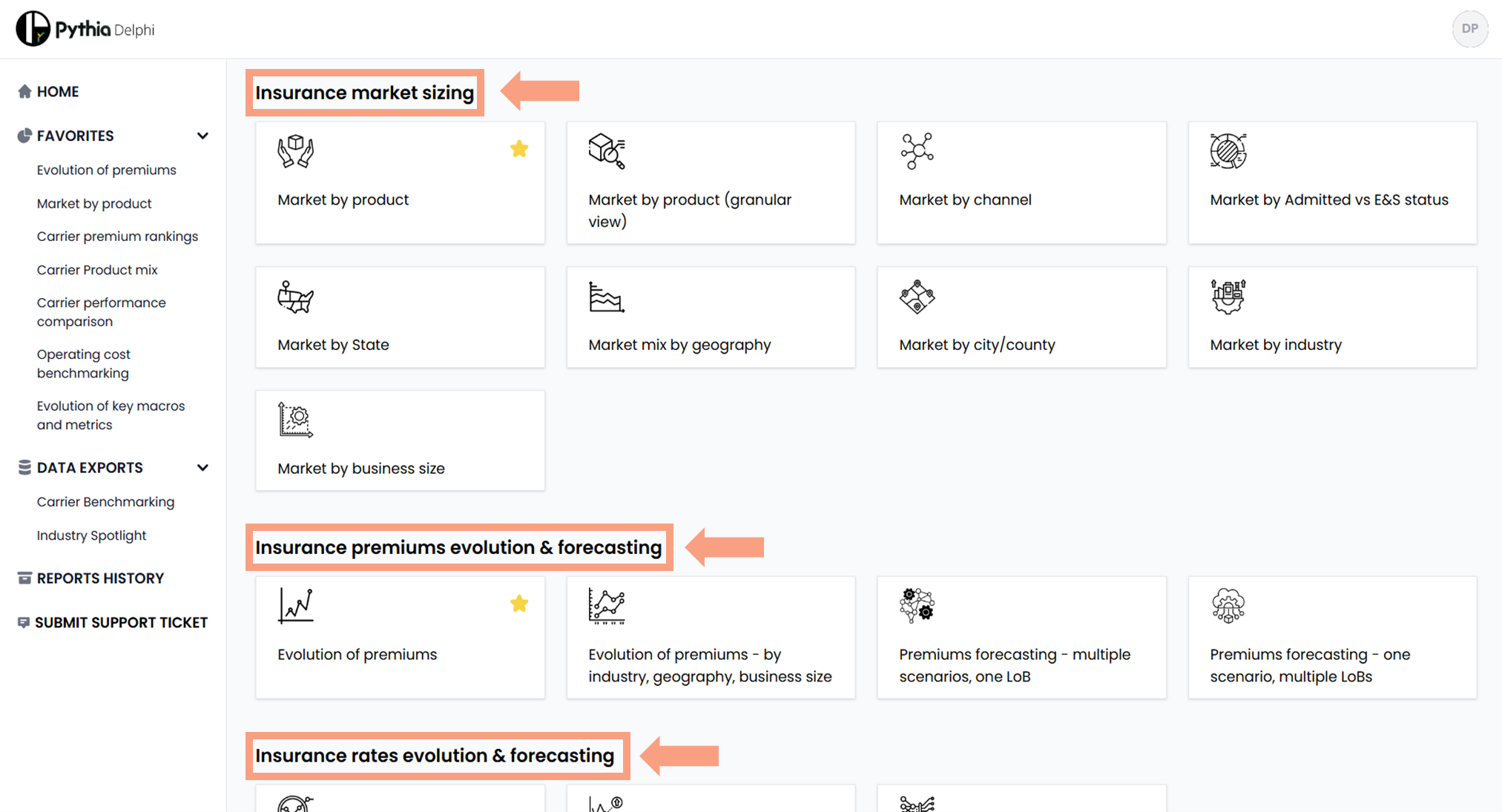
Within each section, you will find multiple use-cases or ‘tiles’ – each representing a different analysis that answers the core question posed in each section. For example, under ‘Insurance rates evolution & forecasting’, tiles provide insights on the historical evolution of market rates or rates forecasting under 30K+ scenarios.
Use-case overview: Navigating use-case panels
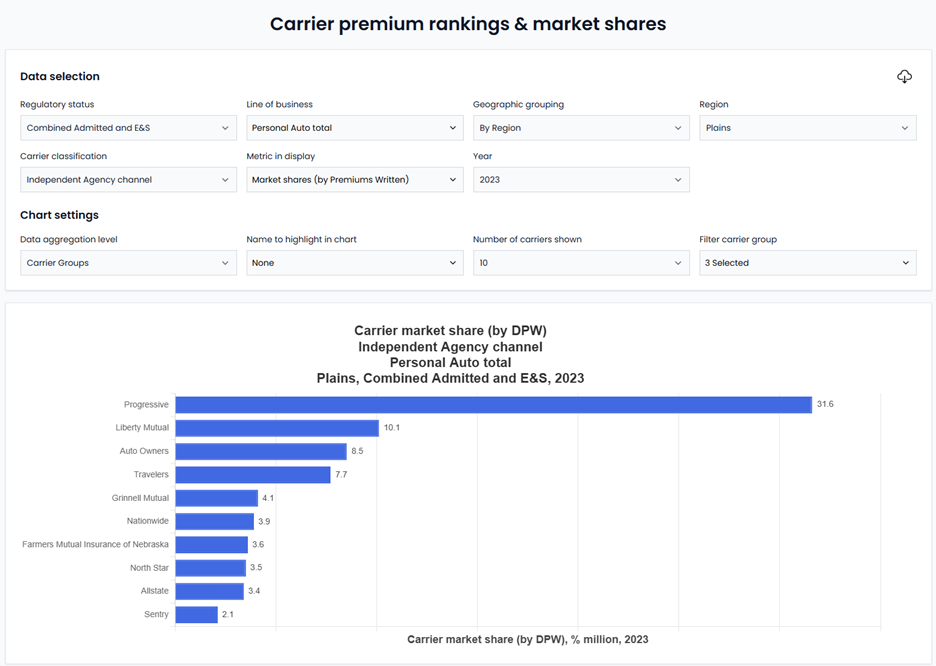
Each use-case utilizes a number of filters that allow you to refine your output and the data displayed. For example, in the ‘Carrier premium rankings & market shares’ tile you can retrieve information on premium and market share rank tables in a few different ways. You can select:
- Admitted vs E&S
- Line of Business
- Geography (State or Region)
- Channel/ carrier classification
- Metric to display (market share vs DPW actuals)
- Year
- Writing carriers vs group carriers
Your selections affect all charts included in each use-case.
Two filters – ‘Select peer group’ and ‘Name to highlight in chart’ – retain the selections made across all use-cases where those filters are available to allow users to more easily jump between use-cases without repeating the selection of the carriers their data are interested in exploring.
For example, if you select State Farm as the insurer you want highlighted in its charts, automatically the platform will maintain the selection across all use-cases offering the choice of a carrier to highlight.
The ‘Select peer group’ filter shows up when in the ‘Filter carrier group’ switch, the user selects the option ‘Peer group’. You can create your custom peer set and use this for data comparisons across the ‘Carrier performance benchmarking’ section or you can use one of our pre-selected peer groups, like ‘top quartile carriers by DPW’.
Data exports: Downloading data for further analysis
Pythia users have two different paths to download data from the platform
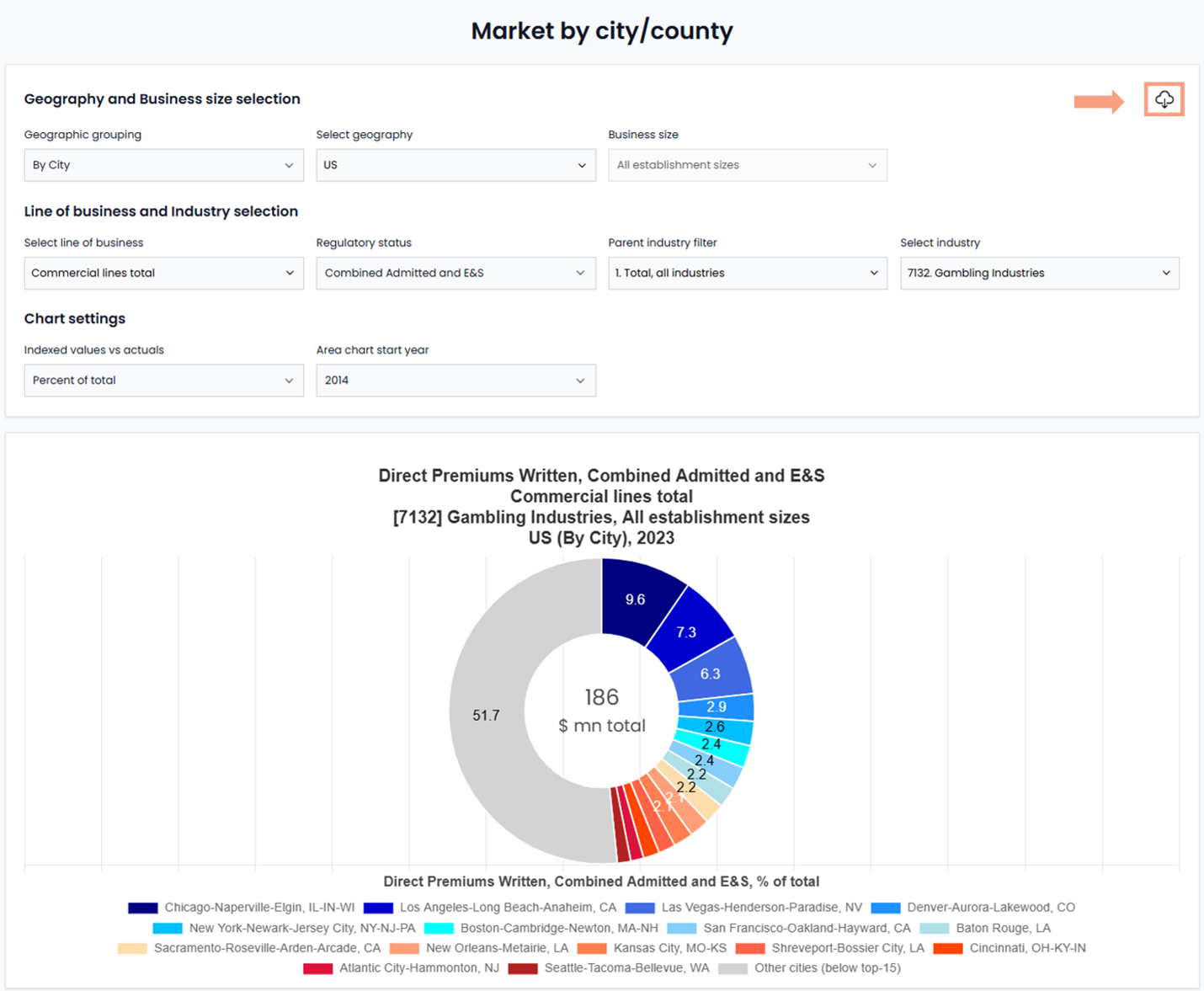
First – the easiest and quickest one – in every use-case, you can directly pull the data viewed by clicking the top-right download button.
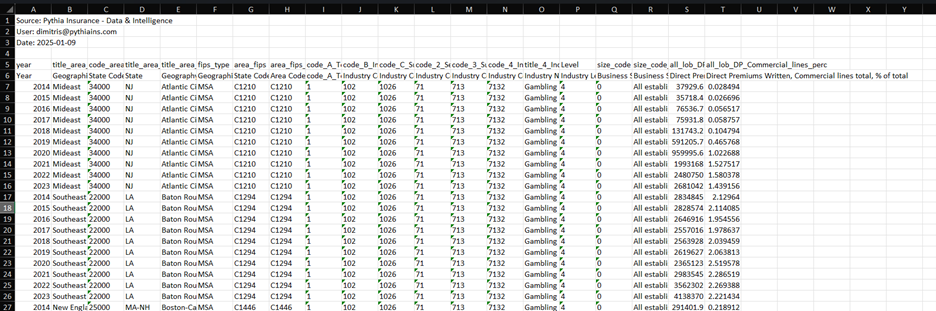
This quickly provides you with an excel file in your downloads folder, which looks like the below:
Second, you can use the ‘Data Exports’ section in the navigation menu on your left-hand side. That’s particularly useful with more extensive data pulls, for broader analyses you are running with your team.
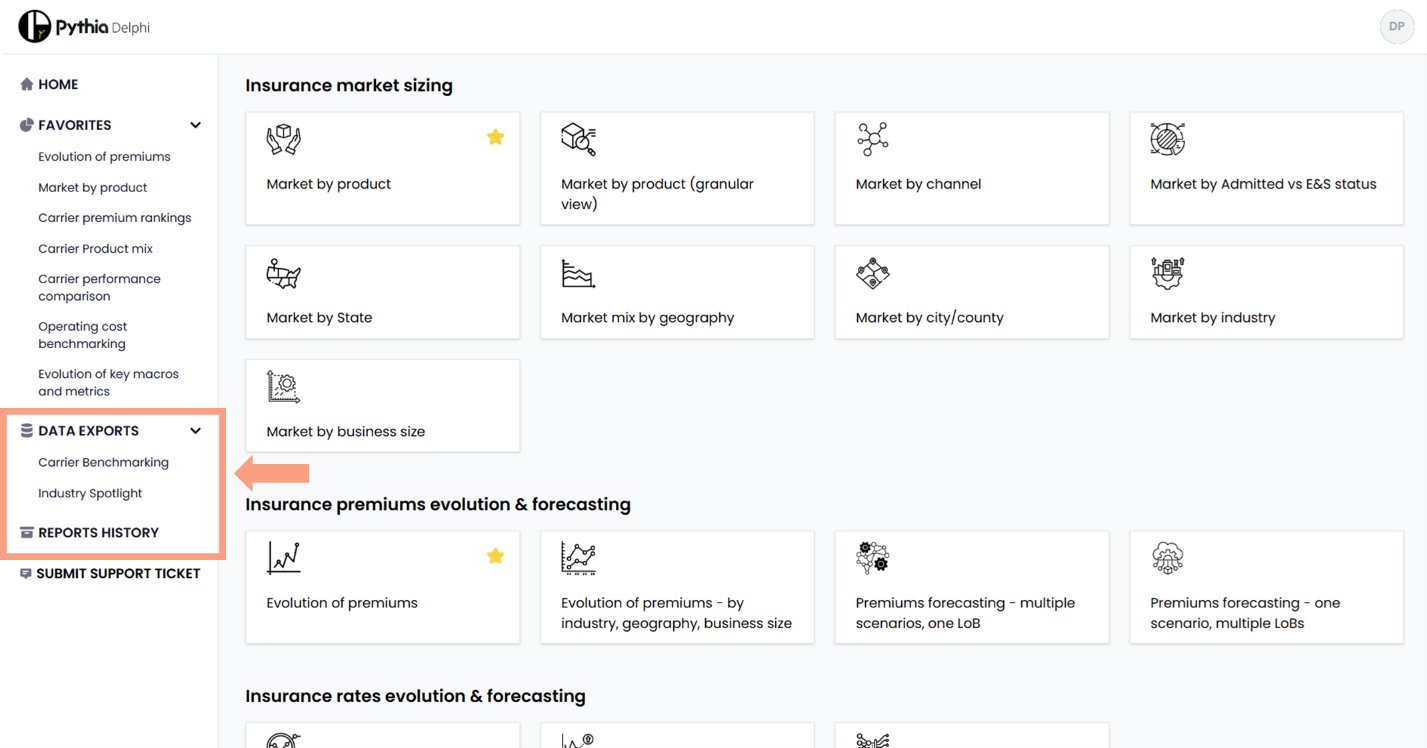
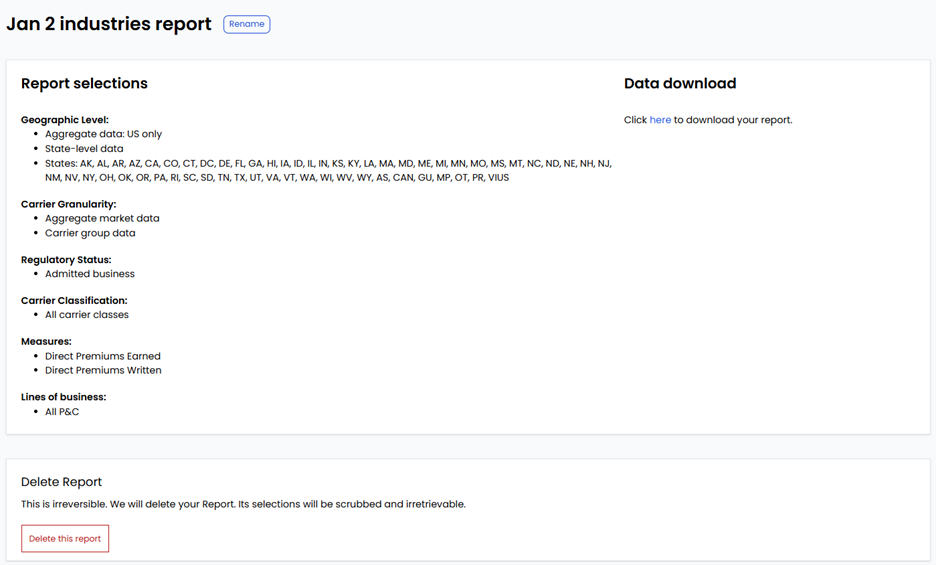
After you follow all steps as prompted by the system, you will end up on a page showing you the selections you made and a link to download the report.
For large reports, you will receive a pop up message that your download is being prepared and that you will receive the link over email shortly.
All your reports are then saved under ‘Reports History.’ (You can name that report to your liking and always change that name later on.) There, you are presented again with two paths to access past data pulls.
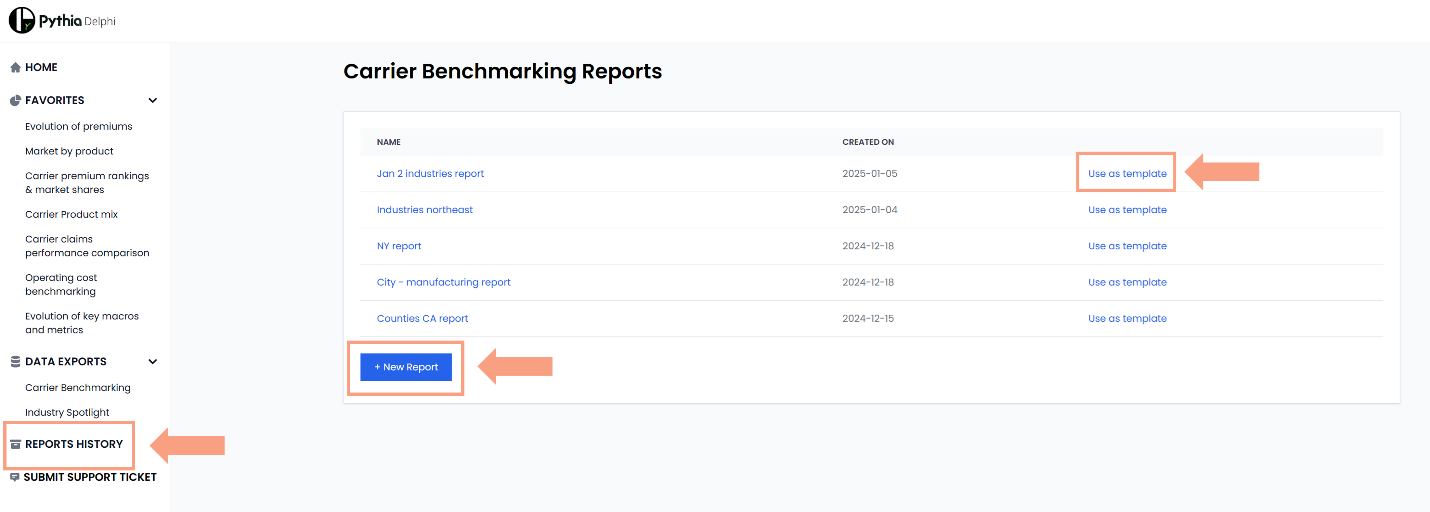
The first one is by clicking on the report you are looking for. That would repeat the email path and also take you to the page with the attributes of the report. (There you can also delete one of the reports you don’t need, but – be careful! – that will be a permanent action). The alternative is to click on the ‘Use as template’ link available next to each individual report you have already created. That will allow you to retrace every step you took to generate that pull and change, where need be, your selection. This is to help you generate multiple reports with similar, but not identical, parameters without repeating every tedious move from scratch!
Lines of business classification: Understanding our LoB classification system
Most of our use-cases allow you to navigate between different lines of business. To choose the right one(s), it is essential to understand Pythia’s hierarchy of lines of business.
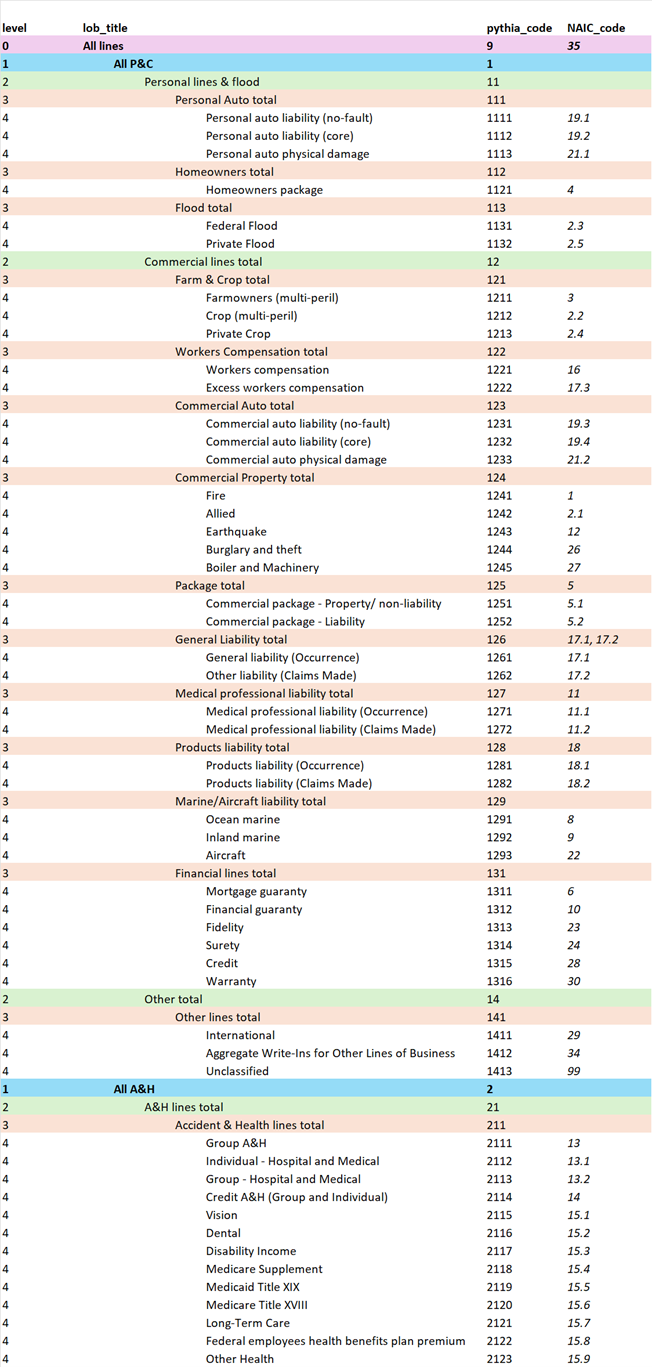
There are five distinct levels of granularity for lines of business, and each one of them is MECE – i.e., mutually exclusive, collectively exhaustive. In simple terms, you can sum premiums in each level of granularity, and you will reach the same number. For example, premiums for the ‘All P&C’ line of business are equal to premiums for ‘Personal lines & flood’ and ‘Commercial lines total’. This allows you to leverage information at different levels, depending on your analysis needs.
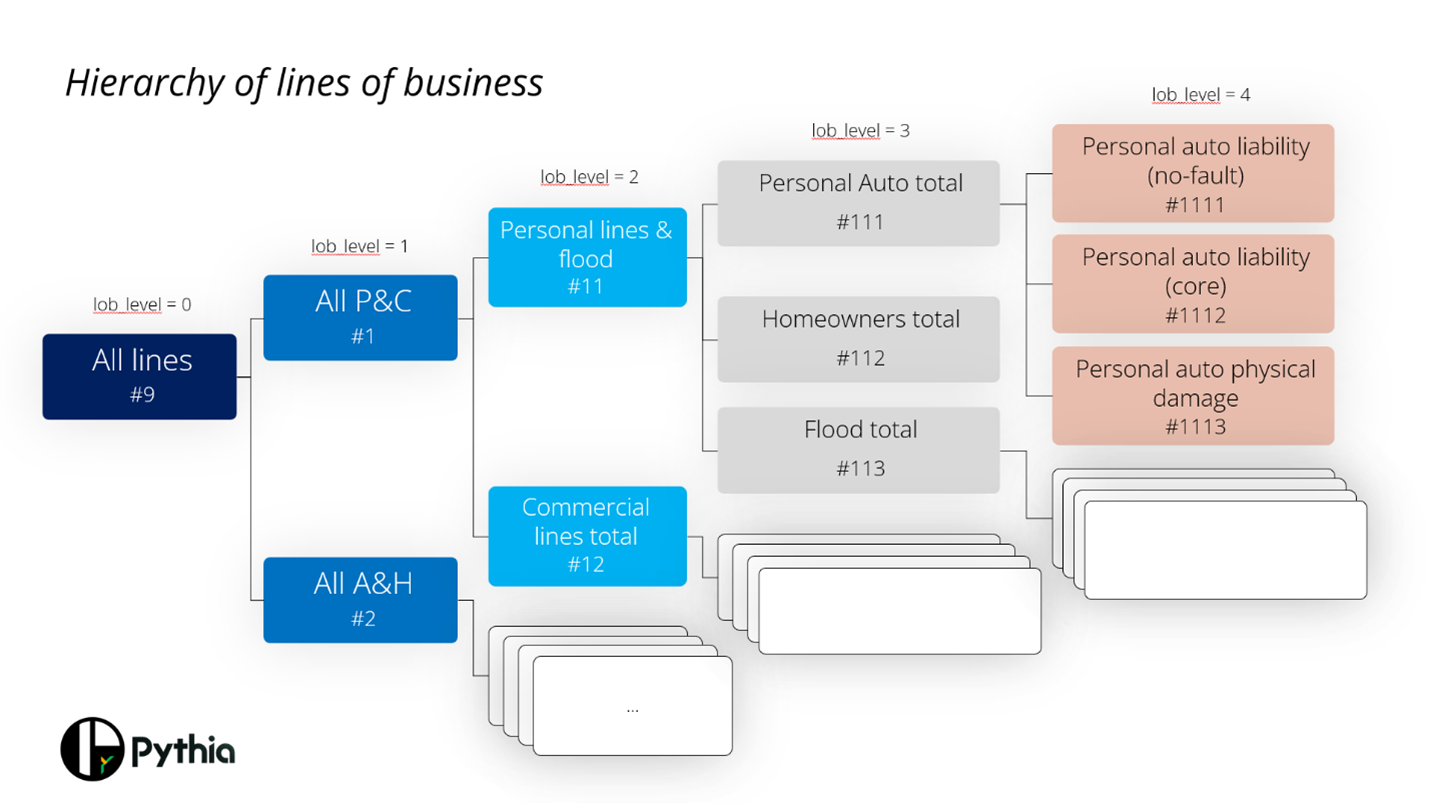
For each line of business, we have a unique ‘lob code’, as well as the parent codes for the levels above. For example, “Personal auto physical damage” has ‘lob code’ #1113. Its immediate parent code is ‘Personal Auto total (#111)’, then the parent of the parent is ‘Personal lines & flood (#11)’ followed by ‘All P&C (#10)’ and ‘All lines (#1)’
The complete hierarchy is as follows:
Insurance entity classification: Understanding Pythia’s carrier classes
Pythia’s team went through regulatory filings for 5,000+ writing carriers to classify writing carriers into classes. By overlaying such information over NAIC data, we help you explore carrier performance at a more granular level of detail and to do benchmarking “apples to apples”.
Pythia classifies carriers into 10+ classes, making it easier to navigate, benchmark, and analyze market performance. Each class reflects a distinct distribution or operational approach, allowing you to customize your insights and comparisons.
- Insurer, Independent Agency-first: These insurers primarily distribute their products through independent agents, leveraging their broad market access to reach diverse customer bases (e.g., CNA’s Continental Casualty)
- Insurer, Exclusive Agency-first: Focused on working with exclusive agents, these carriers maintain control over branding and customer relationships while ensuring tailored agent training (e.g., State Farm’s State Farm Mutual Automobile Insurance)
- Insurer, Direct-first: These carriers sell insurance directly to customers without intermediaries, often relying on digital platforms or direct marketing (e.g., Berkshire’s GEICO General Insurance)
- Reciprocal Exchange: Member-owned carriers where policyholders share risks and benefits, typically offering mutual insurance tailored to specific groups (e.g., USAA’s United Services Automobile Association)
- Farm Bureau: Specialized carriers linked to farm bureaus, often focused on rural communities and agricultural risks (e.g., Iowa Farm Bureau)
- Fronting Carrier: These insurers issue policies on behalf of third parties, focusing on underwriting and leveraging reinsurance partnerships (e.g., Markel’s State National)
- State Insurance Fund: Publicly operated carriers offering specialized insurance solutions, such as workers’ compensation and homeowners, in certain states (e.g., Citizens Property Insurance in FL)
- Lloyd’s Syndicate: A group of underwriters operating under the Lloyd’s marketplace, specializing in complex and niche risks (e.g., State Farm’s State Farm Lloyds)
- Captive Insurer: Owned by the businesses they insure, captive insurers focus on covering risks unique to their parent companies (e.g., Alliance of Nonprofits for Insurance)
- Traditional Risk Retention Group: Member-owned groups created to insure liability risks of their members, often in specialized or underserved industries (e.g., Berkshire’s MedPro)
- Local Government Mutuals: Insurance entities created and owned by local governments to collectively pool risks (e.g., Fire Districts New York)
Forecasting criteria: Exploring our forecasting inputs
In forecasting, Pythia’s AI-trained model leverages 30+ years’ worth of data to help you predict rate movements and capacity needs, using a scenario-based approach. Users can examine the evolution of insurance rates and premiums utilizing 10 distinct assumption categories.
Make your selections and click “Add Scenario”. Your custom scenario will show up below on the list and the data will populate the chart under.
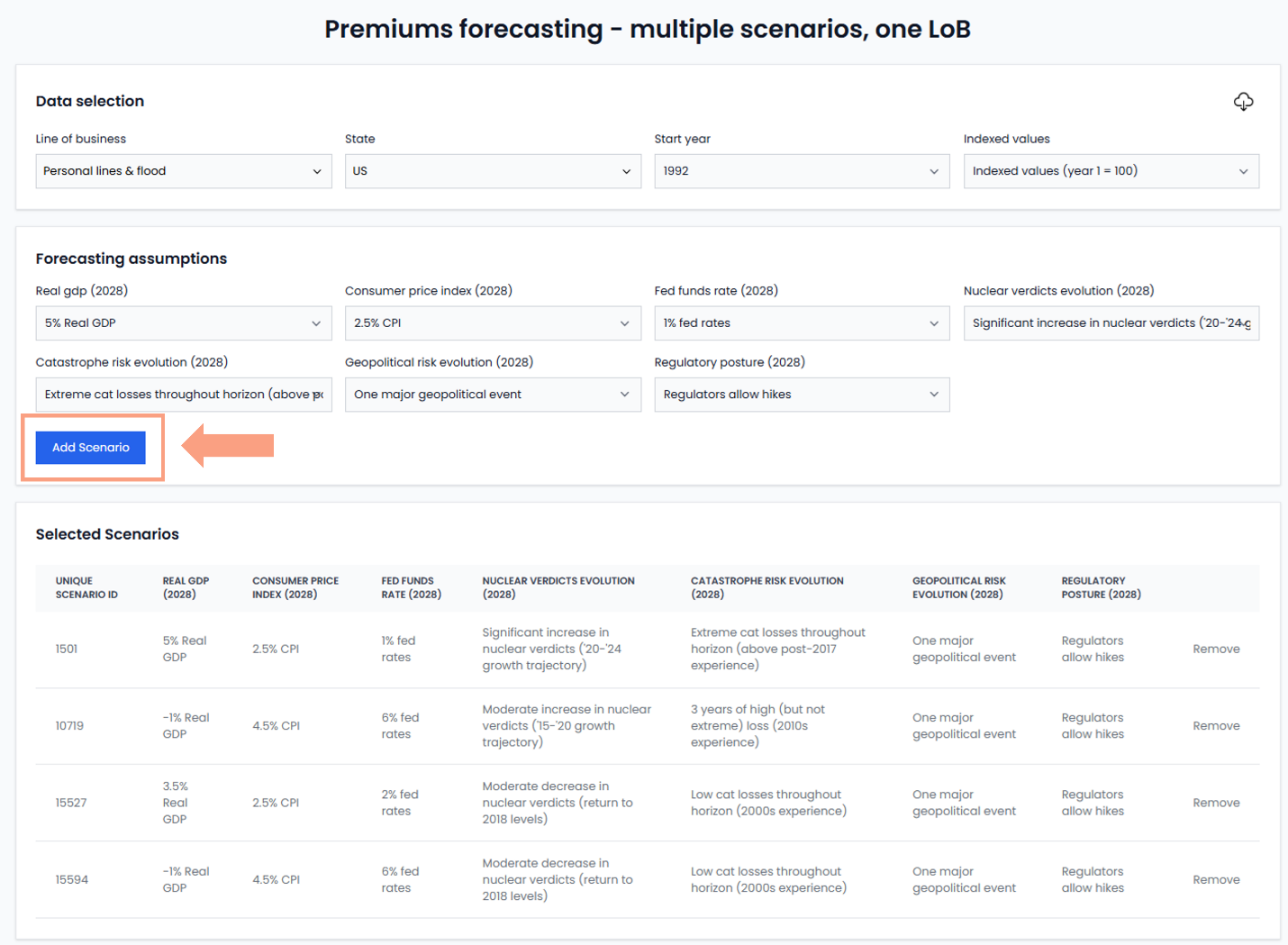
Here’s how our model is thinking about some of the factors coming into play:
- Evolution of Gross Domestic Product: Insured exposures usually grow in tandem with the economy.
- Consumer Price Index: The value of having three-plus decades of data is that your models effectively incorporate three different market cycles, allowing for a more refined approach toward inflation expectations. In our forecasting models, we pick up on the correlation between CPI and insurance rates hardening – both the size of impact and the timing.
- Fed funds rate: When the Federal Reserve is raising rates, it aims to cool down the economy and wrestle inflation. Consequently, higher rates lead to decreased insurance activity and lower insurance penetration to GDP – in other words, people get less insurance for their exposures, reducing limits.
- Nuclear verdicts/ catastrophic events: An environment of high losses leads to more rate increases and, in turn, these lead to more premiums. That assumption is incorporated in our models, with the users opting for a significant jump in nuclear verdicts (compared to what we saw between 2020 and 2024) and severe catastrophic events – meaning above the post-2017 experience that is used as the baseline – are likely to see the direct premiums written in their scenarios take a sharply upward trajectory.
- Geopolitical events: Geopolitical events which tend to depress insurance rates and, sometimes, mark a turn in the rates cycle. We’ve mapped 30+ geopolitical events over the past 3 decades and explored their impact on insurance rates and premiums. Our AI model is trained using these events and can generate different future scenarios, under different geopolitical conditions.
- Insurance regulator response: A binary choice – will the regulator allow for a hike or not? – the user must decide what the future will look like. When we find a sharp increase in direct losses due to nuclear verdicts or cat events, our AI model faces a “fork in the road”. Either regulators allow for rates increases, which translates into the expansion of Admitted markets, or they block rate hikes, forcing some Admitted carriers to exit the market, Admitted premiums to stagnate and E&S premiums to sharply rise.